









RGAA CriteriaInspection with every deliveryWeb and Mobile

Accessibility Testing: Compliance Is Verified With Each Release

Since June 28, 2025, digital accessibility has been mandatory for a large portion of the private sector’s online services. An annual audit is no longer sufficient: what is compliant today may no longer be compliant after three updates.

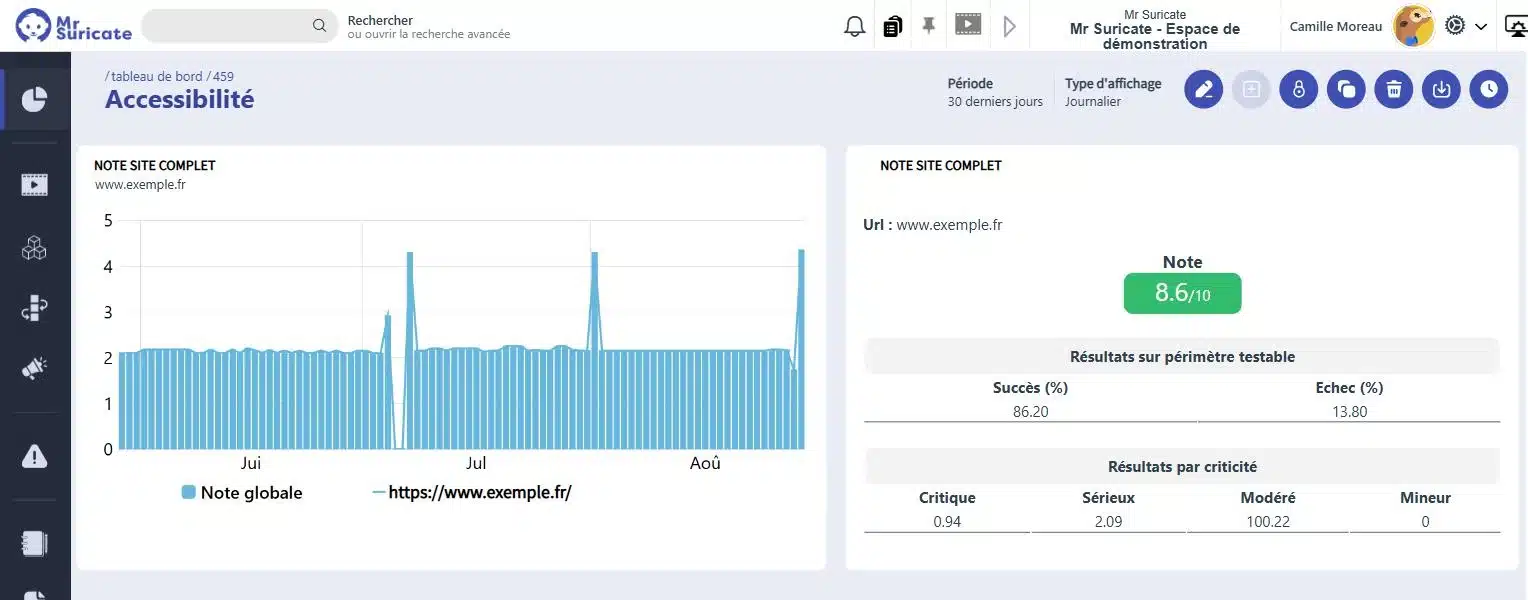
Mr Suricate  Accessibility Dashboard: Score out of 10, Success Rate, and Breakdown of Failures by Severity

They trust us

Retail, banking, manufacturing, transportation, and services: Our clients run nearly 3 million scenario simulations per month on their critical workflows.

Compliance slips through the cracks between audits

An audit brings the site up to standard, everyone is satisfied, and six months later a new component is added without a label, a button color changes, and the contrast falls below the threshold. No one did their job poorly—accessibility simply wasn’t part of the verification process. Once automated, it becomes part of the process just like regression testing.

Mouse icon

Automatically verifiable criteria

Contrasts, text alternatives, field labels, heading structure, page language. Everything that can be controlled without human judgment.

Purple Rectangles Icon

The Journey on the Keyboard

Tab order, focus traps, accessible elements. This is where navigation paths most often fail.

Purple Gear Icon

Compliance is determined based on the entire user journey, not just the homepage. The check follows the scenario.

Purple API Test Icon

Automation covers a significant portion of the criteria, but not all of them. The relevance of a text alternative is assessed; it cannot be calculated.

Integrates with your pipeline without rewriting it

Accessibility testing is triggered from your CI, runs on your production environments, and reports back to where your teams are already working. No retooling required.

1 Triggering Your tools stay in control
  • GitLab
  • Jenkins
  • Microsoft Azure
  • API Call
  • Planning
2 ExecutionMr SuricateYour scripts run on your production environments
  • Web Tour
  • Native iOS and Android Apps
  • Real Mobile Farms
  • APIs and Internal Feeds
3 Restitution The results are delivered right to your workplace
  • Jira
  • Slack
  • SMS
  • Webhook
  • API
And maintenance that stands the test of time
  • Reusable blocksA change updates all scenarios that use it
  • AI-Assisted CorrectionSuggested corrections for scenarios with errors
  • Grouping IncidentsSimilar anomalies are processed only once

How Continuous Assessment Changes Things, Line by Line

Annual Audit Only
With an inspection at every delivery
Compliance is only valid on the day of the audit.
It is verified every time it goes into production.
The discrepancies accumulate over a six-month period.
They are flagged upon delivery, which creates them.
Upgrading is a major undertaking.
It's a correction that takes just a few minutes.
The report is sent as a PDF once a year.
The result is in the same dashboard as the rest.
No one tests using the keyboard.
The keyboard path is part of the scenario.
Accessibility is a topic in its own right.
This is a requirement in the test specifications.
ResultAccessibility gaps detected at the time of delivery should be addressed immediately, rather than waiting until the next audit.
PRACTICAL GUIDE · 2026 EDITIONSoftware Quality and Testing: The Essential GuideThe fundamentals of functional testing, common pitfalls, and a method for building test coverage that stands the test of time.
Download the guide
Mr Suricate provided Mr Suricate with a reliable, automated approach to testing and validating our accessibility requirements, ensuring a seamless customer experience that complies with regulations.”

Grégory LafontHead of Global Omnichannel Applications, Baccarat

Support that ends whenever you want

Mr Suricate replace your QA team—it enhances it. You decide what to handle in-house and what to outsource: creating test scenarios, running them, or maintaining them over time.

  1. 1Identification of critical paths, front-end and back-end
  2. 2Writing Tests Without Code
  3. 3Continuous monitoring and alerts
  4. 4Scenario Maintenance and Development
ResultYou gain broader coverage without increasing your teams’ workload. And if you’d rather delegate everything, QA outsourcing takes over.

YOUR QUESTIONS

Frequently Asked Questions

The most common questions we get about accessibility testing.

What criteria are checked?

The RGAA requirements that are automatically checked: color contrast, text alternatives, form field labels, heading hierarchy, declared language, attributes of interactive components, and keyboard navigation.

Is automation enough to ensure compliance?

No, and this needs to be made clear. A significant portion of the criteria requires human judgment: the relevance of a textual alternative, the clarity of wording, and the consistency of the reading order. Automation handles volume and repetition; it does not replace the audit.

Who is subject to this requirement?

Accessibility has long been a requirement in the public sector. For the private sector, the June 28, 2025, deadline set by the European Accessibility Directive extends this requirement to many online services, including e-commerce, banking, and transportation.

Can we test the accessibility of a mobile app?

Yes, based on the same principle, using criteria specific to iOS and Android platforms. The review focuses on the labels of elements, contrast, and screen reader navigation.

Where should I start?

Through the pathways that drive the service, not through the homepage. An inaccessible checkout process or contact form poses a real problem, whereas a non-compliant corporate page is merely a reporting issue.

What does the report generated each time the program runs contain?

Each check generates a downloadable report—in JSON format for your tools and in HTML format for your teams. It shows the number of tests that passed and failed, both as a count and as a percentage, and details each violation along with the relevant element.

How do we track changes over time?

A dedicated dashboard displays a score out of ten, a trend line for the selected time period, the success rate within the testable scope, and the breakdown of failures by severity: critical, serious, moderate, and minor. You can immediately see if a production deployment has compromised compliance.

Should we create separate scenarios for accessibility?

No. The test is integrated into an existing workflow at the stage of your choice. The same scenario verifies that the funnel is working and that the pages it goes through remain compliant.

What happens when a criterion deteriorates?

The scenario fails and triggers the same workflow as your other tests: incident, alert via email, text message, or webhook, and escalation to Jira or PagerDuty if you’ve integrated them. Accessibility is no longer just an annual audit—it’s now a continuous monitoring process.

Do you only believe what you see?

A 30-minute demo of your own app. You'll see one of your workflows automated in real time, without writing any code.