










GA4, GTM, and the data layerVerified at every stepWithout writing any code

Data Layer Testing: Your Decisions Are Only as Good as Your Data

An event that won't go away, a purchase value of zero, a product ID that changes format. The tagging plan breaks silently, and the error isn't noticed until weeks later, when the numbers don't add up.

app.mrsuricate.com
Tagging Plan ReviewVerification in progress
Data layerGA4Consent
  • view_item ·Product DetailsCompliant
  • add_to_cart ·Add to CartCompliant
  • purchase ·Value at 0Difference
  • consent ·Reject cookiesCompliant
18 monitored events · 1 anomaly detected
Missing Purchase ValueData team notified

A broken tag doesn't break anything else

That’s what makes it dangerous. The site works perfectly—customers make purchases, and no one reports any issues. Meanwhile, the purchase event is recorded with a zero amount, and you’re managing your advertising budgets based on inaccurate data. The problem isn’t discovered until the end of the month, when it’s too late to recover the lost data.

Mouse icon

The Event at the Right Time

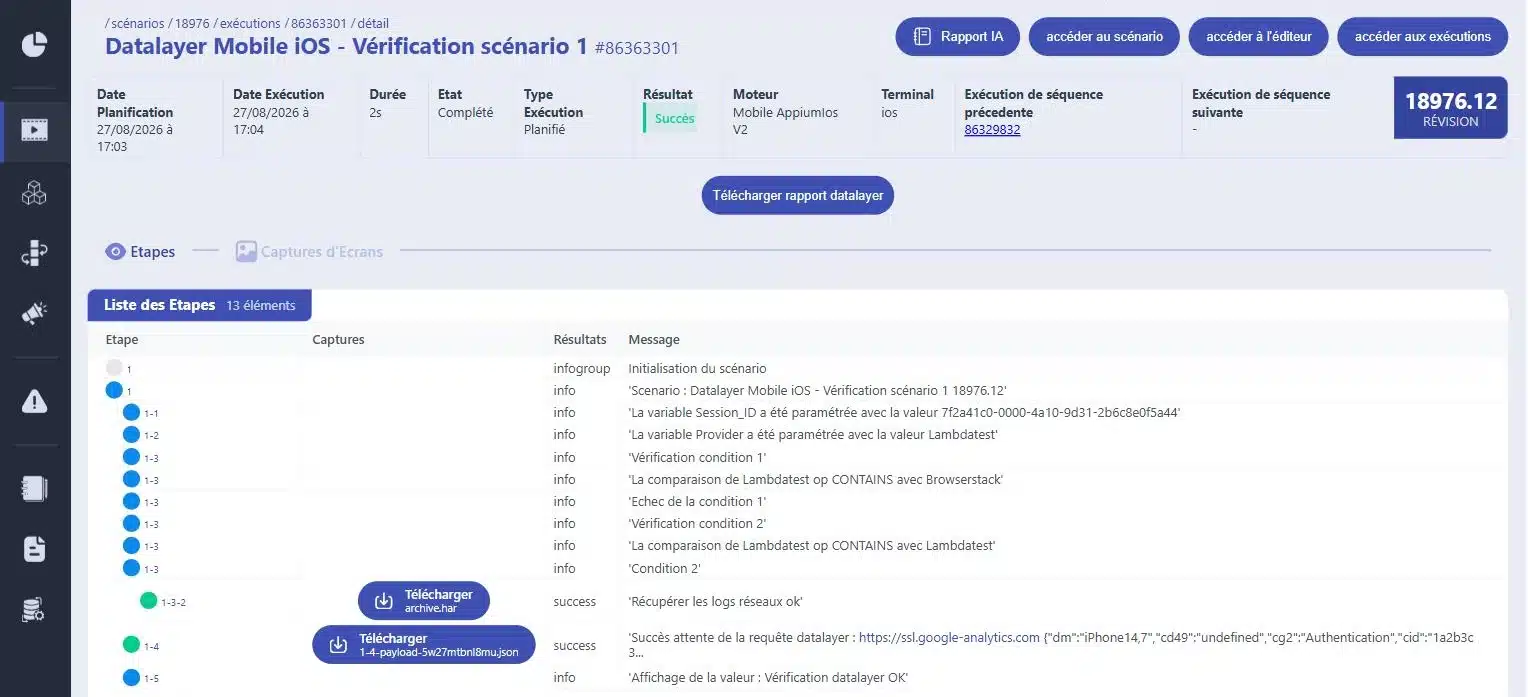
The script tracks the process and verifies that at each step, the expected event is triggered exactly once.

Purple Rectangles Icon

Content, not just the trigger

Product ID, amount, currency, quantity. An event that starts with an empty value is just as serious as a missing event.

Purple Gear Icon

What happens before and after the user makes a choice. A tag that is set despite a refusal is a compliance issue.

Purple API Test Icon

The tagging plan is reviewed just like everything else—not just once a year during an audit.

How Automated, Line-by-Line Validation Makes a Difference

Without tagging verification
With Mr Suricate
The discrepancy is revealed at the end of the month in a report.
It will be revealed on the day it goes live.
We check the tags manually before major events.
They are checked with every delivery.
An event that starts with no entries is treated as an event that has started.
The event content is moderated.
Once data is lost, it's gone.
The delay is limited to a few hours.
This issue falls under the data team's purview, but there's a bug in the code.
The test is in the same test booklet as the rest.
Consent is presumed to have been given.
It is verified in both cases.
ResultA tagging plan verified with every delivery, rather than a data discrepancy discovered a month later.
“With Mr Suricate, we’ve automated label verification, secured our data, and gained the reliability we need to make strategic decisions without errors. Plus, it’s fun!”

Xavier ValetHead of Data Analytics, HelloWork

YOUR QUESTIONS

Frequently Asked Questions

The most common questions we get about tagging control.

What is a data layer test?

This is a scenario that simulates a user journey and checks, at each step, the events pushed to the site's data layer. It verifies the presence of the event, its name, and the content of its parameters.

Does this cover Google Analytics and Google Tag Manager?

Yes. The check focuses on what your site actually sends to the data layer, which is the source of the data received by GTM and then GA4. This is the right level to check: we verify the data being sent, not how it appears in the destination tool.

Is it possible to verify that consent has been obtained?

Yes, and that's one of the most useful scenarios. The script can block cookies, then verify that no tracking tags are being sent, and do the opposite after acceptance. This serves as a check for both compliance and data quality.

When should these tests be administered?

With every production deployment, just as with regression testing. A tagging plan most often fails due to a change to the site that had nothing to do with the measurement—and thus fell outside the data team’s scope of attention.

Do you need a technical background to create these scenarios?

No. The flow is built just like any other scenario, and event handlers are added to the relevant steps. The preliminary work is editorial rather than technical: you need to know which event should be triggered and with what values.

Do you only believe what you see?

A 30-minute demo of your own app. You'll see one of your workflows automated in real time, without writing any code.