

Features

Mr Suricate : AI-assisted automated test maintenance

Mr Suricate maintains your tests with AI that analyzes each failure, confirms the cause through an isolated replay and proposes the fix. Your team validates it in one click. Reusable blocks then apply each fix to all the scenarios that call them.

AI-assisted Correction Reusable blocks Hosting in the EU

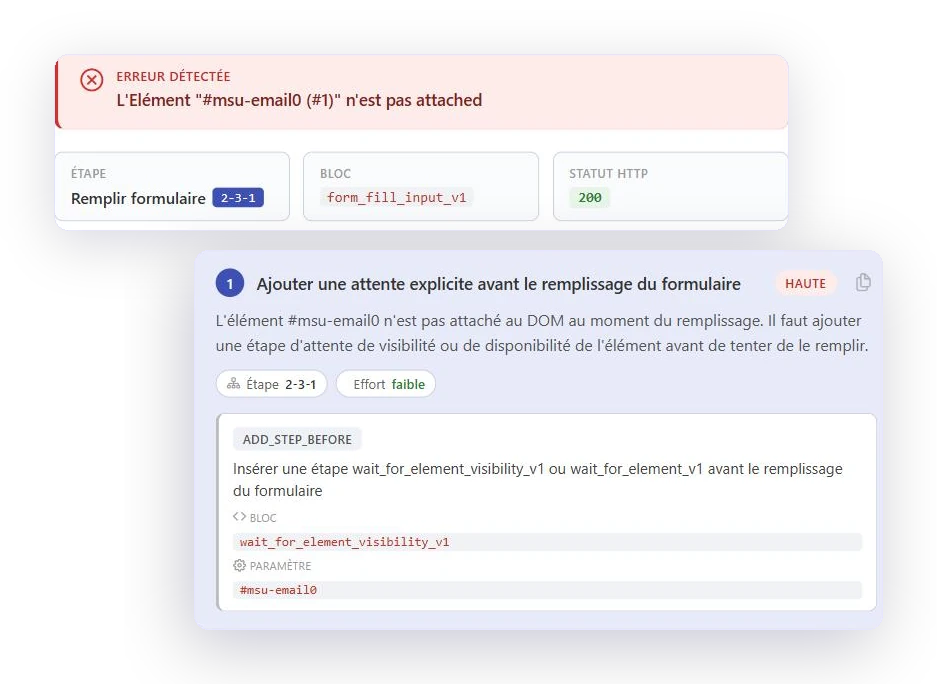
The maintenance assistant displays the detected error, the step and block involved, and suggests the appropriate corrective action

Maintenance—that's where automation projects come to a halt

No one pays attention to maintenance when an automation project gets underway. Yet that’s where it dies. A scenario that breaks with every interface update eventually gets disabled until it can be fixed—then a second one, then ten. Test coverage quietly collapses, and the dashboard stays green because only the easy tests remain.

For our clients, fleet maintenance costs approximately 5 minutes per month per scenario, according to our internal observations. For a fleet of 100 scenarios, this equates to one day per month. To plan for this work from the outset, our guide explains how to implement a QA process , and the software testing trends for 2026 demonstrate why maintenance has become a critical issue.

This observation is not unique to testing. A study published in the Journal of Systems and Software (Besker, Martini, and Bosch, 2019) reports that developers say they lose an average of 23% of their time due to technical debt. These data are self-reported: 43 developers provided the information via a questionnaire over a seven-week period. At Google, approximately 16% of tests are unstable, and about 84% of instances where a test goes from green to red involve an unstable test (Google Testing Blog, May 2016). The scale is not comparable to that of a customer base, but it shows that making tests reliable is a genuine engineering challenge.

When it breaks

What Happens Between Failure and Correction

A scenario pops up on a Tuesday morning. Here are the five screens you'll go through, in order, until it turns green again.

1

You can tell right away where it broke

The script clearly shows which step failed and the exact message returned by the engine. The log shows how long this has been going on, how often it occurs, and which of these runs triggered an incident. No one needs to replay the process to know what we’re talking about.
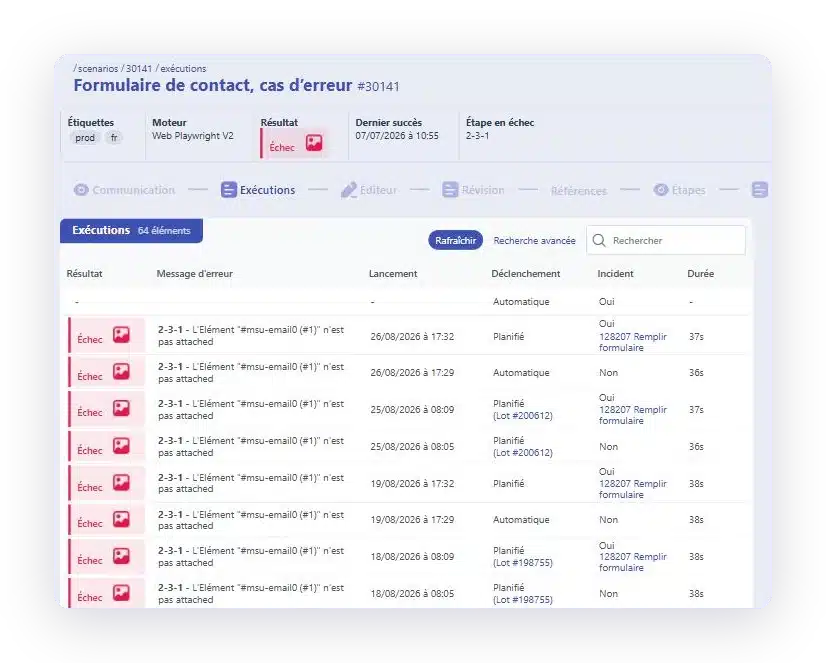
  • The incorrect step, numbered, at the top of the worksheet
  • The engine error message, as is
  • Each execution, along with its trigger—whether scheduled or automatic
  • The link to the incident, if there is one
  • Screenshot and video of the scene
The execution history of a failed scenario, showing the step that caused the error and the error message repeated
The execution history of a failed scenario

2

The incident is classified, not just reported

A raw failure tells us nothing. The incident, on the other hand, carries its own cause and severity level, and it has been classified as either a true positive or a false positive. It counts its occurrences rather than piling them up; it knows which scenarios it affects; and it does not reopen four times for the same reason.
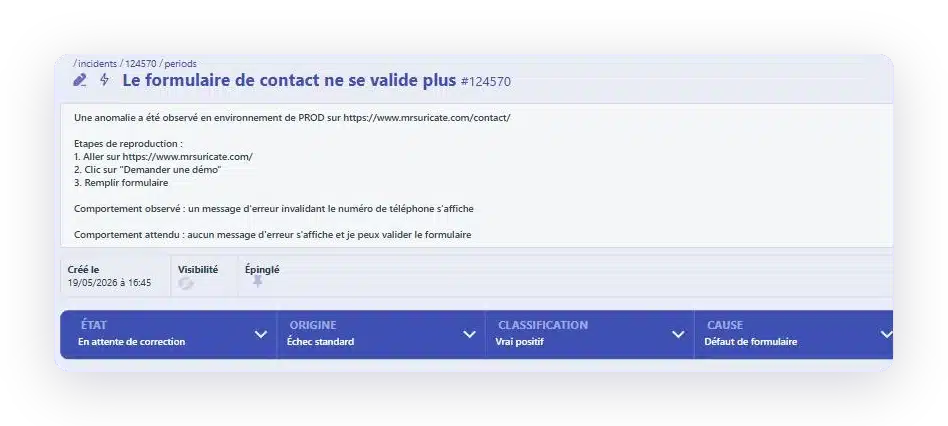
  • Cause and Severity Specified
  • True positive or false positive, clearly defined
  • Reproductive stages, observed and expected behavior
  • Repetitions counted, not stacked
  • The relevant scenarios associated with this
An incident report, including its reproduction steps, status, origin, classification, and cause
An Incident and Its Classification

3

The assistant suggests a correction

Before suggesting any action, the AI ​​categorizes the cause: moved element, modified navigation, actual bug, unwanted popup, or instability. If the test is correct, it leaves it alone. Otherwise, it reads the error, the affected block, its parameters, and the page context, then proposes corrections ranked by priority and effort. Each correction specifies which block to insert or replace, and with which parameters. You review the corrections, apply them, or discard them.
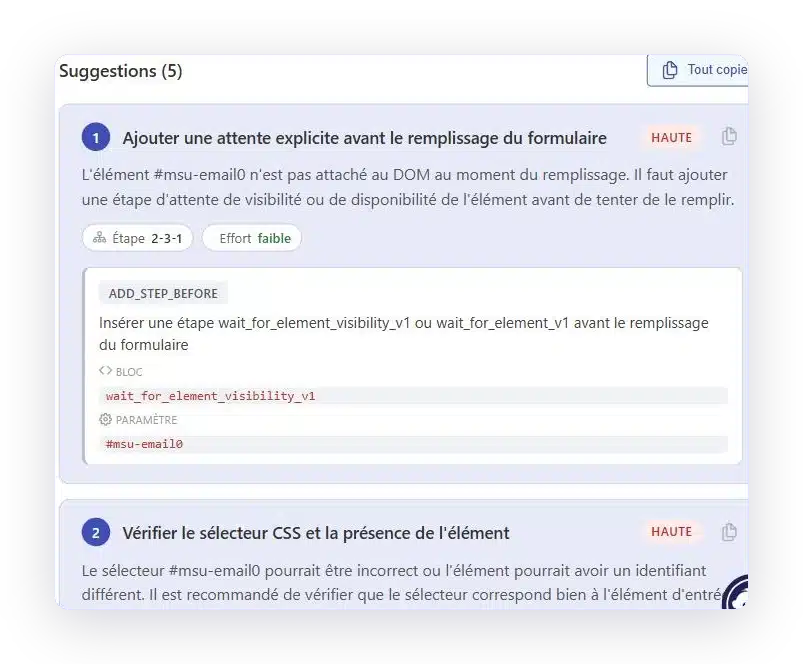
  • Corrections Sorted by Priority and Effort
  • The exact block to insert or replace
  • The parameter to use, ready to copy
  • The decision is still up to you
The maintenance wizard suggests five solutions, ranked by priority, along with the module and setting to use
Corrections suggested by the assistant

4

You can play again, on your computer and on your own terms

Suricapture replays the scenario on your machine, step by step, in a real browser. You see the failure happen instead of inferring it from a log, and you can take control of the step that’s causing the problem. Before opening any incidents, the platform automatically replays technical failures on its own.
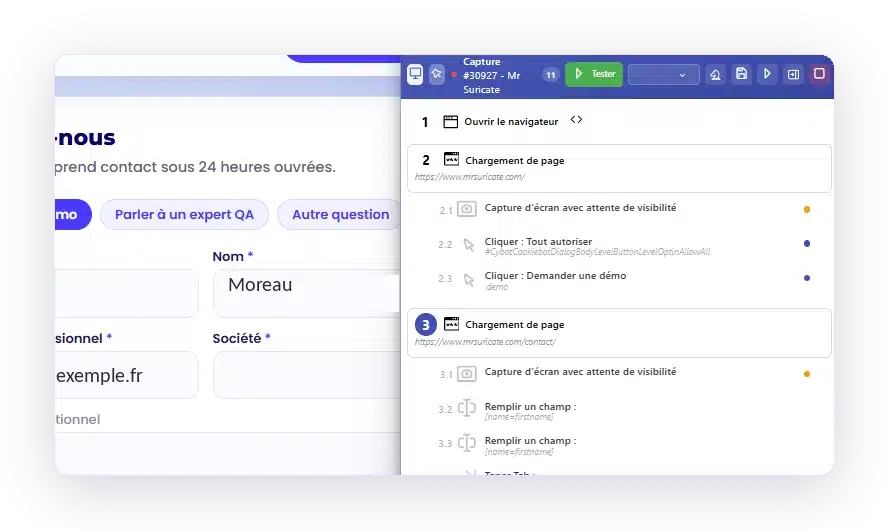
  • Play it locally, right in your browser, right before your eyes
  • Pause at the step that’s causing trouble to correct it manually
  • Automatic replay in the event of a technical error, before any alert is triggered
  • Environment, dataset, and resolution of your choice
Suricapture replays a scenario step by step in a browser, using the "Test" button
Replaying a scenario from Suricapture

5

The metablock—corrected once, propagated everywhere

Logging in, accepting cookies, selecting a location: these steps recur in almost all of your user journeys. They’re contained within a single metablock. When the interface changes, you update the metablock, and all the scenarios that call it are automatically brought back up and running together.
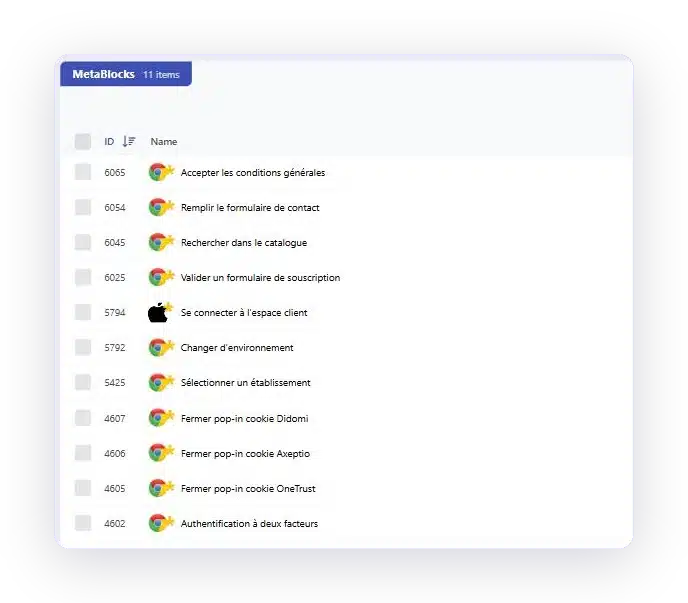
  • A block written once, called from anywhere
  • One correction; all scenarios are up to date
  • Web, iOS, and Android in the same library
The library of reusable metablock, named in French
The Metablock Library

What assisted maintenance changes, line by line

No tool-based maintenance
With Mr Suricate
A selector changes, and the script encounters an error.
The AI ​​classifies the cause and proposes the correction; your team validates it.
Each error is analyzed manually, one by one.
Errors with the same cause are grouped together.
The user connection is rewritten in each scenario.
A modified block updates all scenarios.
Scenarios that are too costly to maintain are disabled.
Coverage remains stable over time.
The drop in coverage isn't visible anywhere.
The discrepancy is evident in the report.
Maintenance is entirely the responsibility of the QA team.
You choose what to delegate.
Result: When a scenario breaks, it takes about an hour to restore it, and the coverage does not collapse at the first interface change.
Before we started using Mr Suricate tools, it took us an entire day to retest all the site’s features after a new version was released. Now, it only takes 10 minutes. In just 10 minutes, using about 40 critical test scenarios in pre-production, we know whether everything is OK or not. For us, that’s the best selling point: the time savings.

Michael AlimiDOSI, Intersport

YOUR QUESTIONS

Questions We Get Asked About Maintenance

Self-healing, reusable blocks, work sharing: answers to the most frequently asked questions on Mr Suricate .

Does Mr Suricate practice self-healing?

Mr Suricate goes beyond typical self-healing. It finds a broken selector and offers a replacement, without understanding why it changed. Mr Suricate simultaneously captures the screen, the DOM, the logs, and the test intent, categorizes the cause, confirms it with an isolated replay, and proposes a fix that your team approves with a single click. Repairing without understanding is like creating meaningless green.

What does Mr Suricate do when the AI ​​can't find the solution?

Mr Suricate raises the scenario as an incident, including the step that failed and a screenshot of what the user would have seen. You fix the block once, and the fix is applied everywhere that block is used. If the cause is an application bug or an unstable environment, the test remains unchanged: we never modify a test just to silence an alert.

How does Mr Suricate distribute maintenance between the platform and your team?

At Mr Suricate, you’re in charge. The platform doesn’t replace your QA team, it enhances it. Our teams can handle all or part of the scope, and this division of labor isn’t set in stone.

How do Mr Suricate 's reusable blocks reduce maintenance?

In Mr Suricate, an action that is repeated across multiple scenarios, such as user login or checkout, becomes a single shared block. Once modified, it updates all scenarios that use it.

Does Mr Suricate handle the recovery after an interface redesign?

Yes, Mr Suricate handles it, but that’s not the AI’s job. A complete rewrite goes beyond assisted editing: it involves reworking scenarios, and it’s one of the most common reasons people turn to our teams.

Do you only believe what you see?

A 30-minute demo on your own application. You will see a scenario build, break, and then be fixed.