









15× shorter TNR timeWeb, Mobile, and APIsWithout writing any code

Non-regression testing: Deliver without breaking what already works

With every release, the question is the same: Does what worked yesterday still work? Automated non-regression testing answers that question in just a few minutes, across all your user flows, before the release goes live.

app.mrsuricate.com
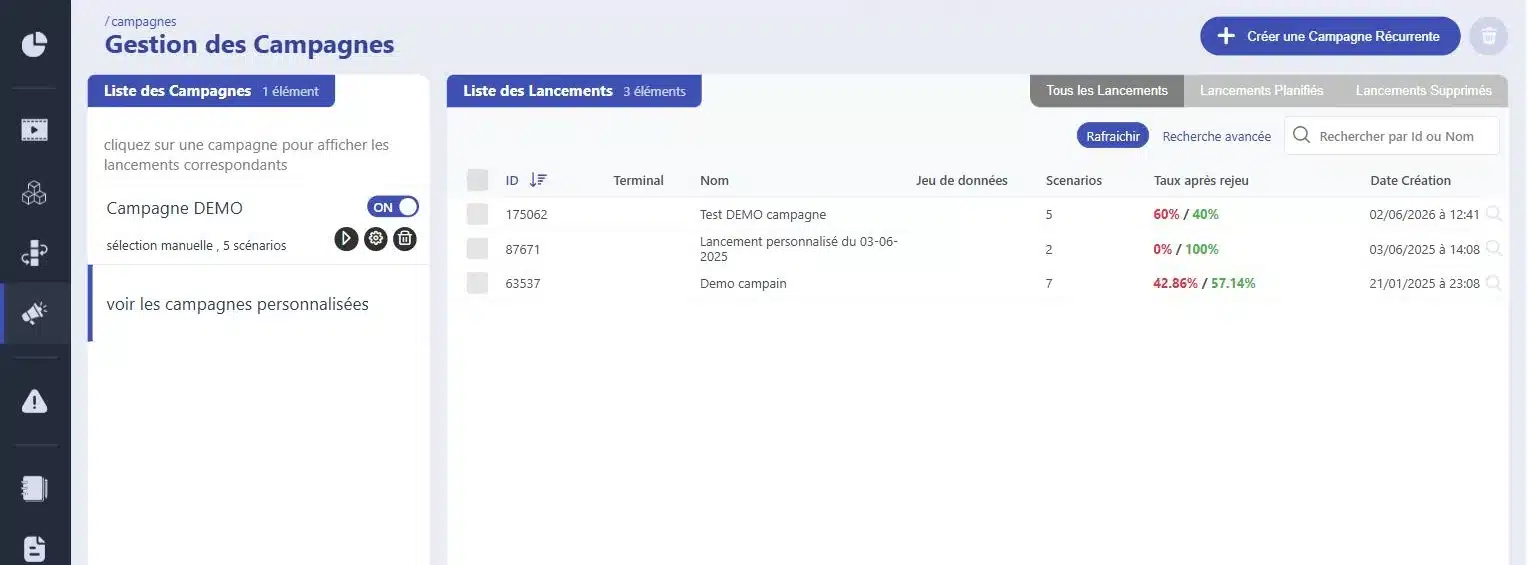
No-Regression CampaignIn progress
WebsiteMobile appAPI
  • Web ·User LoginSuccessful
  • Web ·Add to CartSuccessful
  • Web ·Promo CodeRegression
  • API ·Order CreationSuccessful
120 scenarios replayed in 8 minutes
Regression DetectedDeployment blocked

They trust us

Retail, banking, manufacturing, transportation, services: Our clients rerun their non-regression testing campaigns with every release, resulting in nearly 3 million scenario runs per month.

It's never the new feature that breaks things; it's the one we didn't retest

A change to the shopping cart, and suddenly the promo code no longer applies. The connection between the two wasn’t obvious to anyone. Regression testing is the most useful discipline—and the first one we tend to abandon—because manually retesting a hundred scenarios before each release simply doesn’t fit into any schedule. Once automated, the entire campaign runs again with every release without requiring the team’s involvement.

Mouse icon

The entire campaign, with every release

This selection was not made in a rush. All previously approved routes are reviewed again before each deployment.

Purple Rectangles Icon

A failed scenario can halt your deployment. Decisions are based on results, not on intuition.

Purple Gear Icon

Screenshot, exact step, data used. You can see what has changed, not just that something has changed.

Purple API Test Icon

Self-healing repairs some of the breaks, and a modified block updates all the scenarios that use it.

Integrates with your pipeline without rewriting it

Your campaign triggers with every merge, runs on your staging environments, and reports any discrepancies to your teams' tools. No need to reconfigure anything.

1 Triggering Your tools stay in control
  • GitLab
  • Jenkins
  • Microsoft Azure
  • API Call
  • Planning
2 ExecutionMr SuricateYour scripts run on your production environments
  • Web Tour
  • Native iOS and Android Apps
  • Real Mobile Farms
  • APIs and Internal Feeds
3 Restitution The results are delivered right to your workplace
  • Jira
  • Slack
  • SMS
  • Webhook
  • API
And maintenance that stands the test of time
  • Reusable blocksA change updates all scenarios that use it
  • AI-Assisted CorrectionSuggested corrections for scenarios with errors
  • Grouping IncidentsSimilar anomalies are processed only once

How Automation Is Changing Things, Line by Line

Manual non-regression
With Mr Suricate
One day of testing before each release.
The same campaign runs for about ten minutes.
We narrow the scope as the date approaches.
The scope remains the same, regardless of the date.
Regressions are discovered after the site goes live.
They are detected earlier and can block the deployment.
No one wants to repeat last quarter's campaign.
Reusable blocks are updated all at once.
The result is stored in a shared file.
Each execution is logged, time-stamped, and comparable.
The delivery schedule is limited by QA capacity.
You make deliveries more often, with the same team.
Result15 times less time spent on non-regression testing, and about 50% fewer bugs in production.
WHITE PAPERTest Automation: Everything You Need to Know Before You StartWhy Manual Non-Regression Testing Campaigns Eventually Fail, and How to Build a Sustainable Automation Strategy.
Download the guide
“Before we started using Mr Suricate’s tools, it took us an entire day to retest all the site’s features after a new version was released. Now, it only takes 10 minutes. In just 10 minutes, with about 40 critical test scenarios in pre-production, we know whether everything is OK or not. For us, that’s the best selling point: the time savings.”

Michael AlimiDOSI, Intersport

Support that ends whenever you want

Mr Suricate replace your QA team—it enhances it. You decide what to handle in-house and what to outsource: setting up the campaign, running it with each release, or maintaining it as the application evolves.

  1. 1Identification of critical paths, front-end and back-end
  2. 2Writing Tests Without Code
  3. 3Continuous monitoring and alerts
  4. 4Scenario Maintenance and Development
ResultYou gain broader coverage without increasing your teams’ workload. And if you’d rather delegate everything, QA outsourcing takes over.

YOUR QUESTIONS

Frequently Asked Questions

The most common questions QA teams ask us about non-regression testing.

What is a non-regression test?

It involves re-running previously validated test scenarios to verify that a product update hasn't caused any issues elsewhere. We don't test the new features; we test everything that existed before and that needs to continue working.

How often should a campaign be launched?

At least before each production deployment. Many teams go a step further and trigger the campaign with every integration, or schedule it to run every night, so that any discrepancies are caught the same day rather than at the next release.

How long does an automated campaign take?

A campaign consisting of about 100 scenarios takes about 10 minutes to run, with the scenarios executed in parallel. Whereas a manual campaign used to take a full day’s work for the team, that scheduling constraint is now eliminated.

Who maintains the scenarios as the application evolves?

The choice is yours. Self-healing automatically repairs some of the issues; a reusable block that’s been modified once applies to all scenarios; and the rest can be handled by your teams or delegated to ours.

Can a failed test prevent a release?

Yes. The campaign results can be reported to your integration pipeline via API, and a failure in a critical scenario can halt the deployment before it reaches your users.

How do you choose which scenarios to include in the campaign?

We start with the critical paths—front-end and back-end—and prioritize based on impact: what affects revenue, what’s regulatory, and what’s already broken. An effective campaign is a short one that’s run frequently.

What should we do about unstable tests—the so-called "flaky" ones?

We look for the cause before rerunning the test. An unstable test is most often the result of an improperly defined expectation or a fragile selector, not random chance. AI-assisted troubleshooting suggests a fix, and a test that’s rerun blindly ends up proving nothing.

Is a dedicated environment required?

No. The campaign runs on your existing environments—test, pre-production, or production—depending on the scenario. Variables and datasets are defined by environment, without duplicating the scenario.

How long does it take to automate an existing campaign?

It depends on the number of scenarios and their complexity, but the absence of code changes the scale: we're talking about weeks of development, not a full-fledged development project.

Do you only believe what you see?

A 30-minute demo of your own app. You'll see one of your workflows automated in real time, without writing any code.