
In a nutshell: There’s more to life than just functional testing! This guide covers: Why is user experience a major business issue?, What exactly is a graphical non-regression test (GNT)?, Why perform graphical non-regression tests?.
There’s more to life than just functional testing! To build an effective acceptance testing strategy, it’s essential to rely on the fundamentals of automated testing and QA. Among these pillars, visual regression testing is crucial for verifying the visual quality of your website or application. But what exactly is it? Why is it so often overlooked—the “poor relation” of development cycles? We’ll explain everything.
Why is aesthetics a major business issue?
According to the latest infographic from Voucher Cloud, 92.6% of users say that a website’s design and visuals are the main factors influencing their decision to make a purchase . But what about cart abandonment due to display issues? Take two minutes to put yourself ina user’sshoes. You’re calmly browsing a website, looking for a brand-new bike to enjoy the nice weather and go on long rides, when suddenly… a major glitch causes all the bike photos to overlap, making the page unreadable. Or maybe you’ve fallen in love with the bike of your dreams, but you can’t find the “Add to Cart” button anywhere. That’s a pretty major hurdle, isn’t it? And that’s exactly why it’s so important to run regular graphical regression tests.
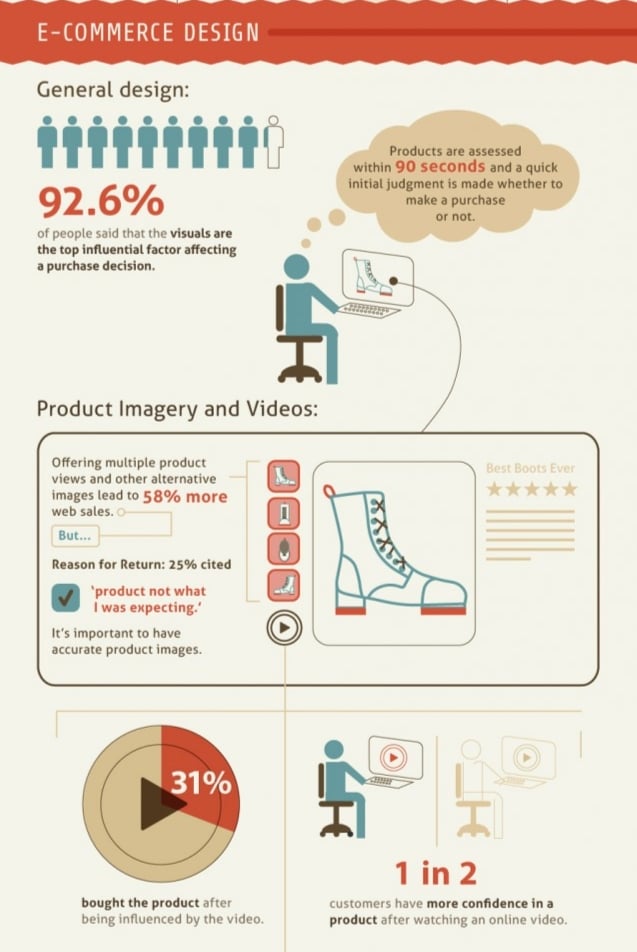 © Voucher Cloud
But what is a graphical non-regression test (NRT)?
Graphical comparison tests, or visual tests (yes, so many different terms for the same thing), are used to verify that the website or mobile app displays correctly for all users. Basically, this involves ensuring that every element (buttons, text, photos, images, etc.) on a given page appears in the right place, with the correct size, color, shape, and so on. We refer to these as comparison or regression tests because they are used to verify that the website or mobile app matches its previous version down to the pixel (pixel-perfect) and complies with legal requirements.
Graphical comparison tests are among the tests that can be easily automated using current technologies. But how does it work? In the context of test automation, this involves generating, analyzing, and comparing screenshots taken while running test scenarios to detect whether any elements have changed or moved visually. By configuring an allowed tolerance percentage, the solution evaluates the similarity between the reference image and the image from the current run.
A simple, unintended color change in a button, a misalignment in the layout, or even a difference in the font is enough to cause the graphical comparison test scenario to fail. We can also take the example of one of Mr Suricate clients, Mr Suricate whom customer reviews were no longer displaying —and the graphical comparison test helped detect this bug.
Furthermore, graphical non-regression testing (NRT) also makes it possible to verify that mandatory legal disclosures in certain countries (notably the U.S. and Asian countries) are displayed correctly to ensure compliance.

Why conduct visual non-regression tests?
And why not? Sure, that’s a bit of an easy answer, and it’s not exactly what this article is about, is it? In reality, there are plenty of reasons to conduct visual tests.
To begin with, we could cite the same reason as for conducting non-regression testing (NRT) in general. Whenever there is a change or update to the interface, it is important to verify that it has not disrupted the design or usability. And from a visual standpoint, there are often redesigns or improvements. Furthermore, with the proliferation of operating systems, web browsers, and devices, it’s becoming crucial to ensure that the user interface displays correctly across all of them.
But then, why not just run functional non-regression tests (NRTs)? Because they generally don’t cover the visual aspects of the website or mobile app. A website may have a broken layout and still be functional—unless elements disappear—so an automation tool could very well pass a functional test on a non-compliant interface. Graphical non-regression tests therefore fill these gaps and help detect potential visual bugs that would go unnoticed with functional tests.
That said, if there were only one good reason to conduct graphic comparison tests, it would be to ensure the best possible user experience. As we mentioned at the very beginning of this article (and it doesn’t hurt to repeat it), 92.6% of users say that website design and visuals are the main factors influencing their decision to make a purchase. Conversely, they won’t overlook a single visual glitch. It only takes one to deter them from buying or cause them to abandon the website or mobile app, leading to a loss of business and damage to your brand’s reputation. And the only way to avoid these glitches is to perform graphical regression tests as often as possible.
One last point? No problem. By delivering a website or app free of visual bugs, you ensure a high-quality product, which not only helps strengthen your credibility and users’ trust in your company, but also, as a result, your brand image.
Did you understand what graphical comparison tests, graphical nonregression tests, and visual tests are? Have you done any of these before? And if not, has this article convinced you to try them? Feel free to share your feedback in the comments!

FAQ
Why is aesthetics a major business issue?
According to the latest infographic from Voucher Cloud, 92.6% of users say that a website’s design and visuals are the main factors influencing their decision to make a purchase. But what about cart abandonment due to display issues? Take two minutes to put yourself in the shoes of an internet user.
But what is a graphical non-regression test (NRT)?
Graphical comparison tests—or visual tests (yes, so many different terms for the same thing)—are used to verify that a website or mobile app displays correctly for all users. Basically, this involves ensuring that every element (buttons, text, photos, images, etc.) on a given page appears in the right place, with the correct size, color, shape, and so on.
Why conduct visual non-regression tests?
And why not? Sure, that’s a bit of an easy answer, and it’s not exactly what this article is about, is it? In reality, there are plenty of reasons to conduct visual tests. For starters, we could cite the same reason for conducting non-regression tests (NRTs) in general.
Further Reading
To see the solution in action, check out our non-regression tests.
Take it a step further: graphical non-regression testing.