


In a nutshell: Data is the fuel that drives a digital strategy. But what happens if that fuel is adulterated? This guide covers: What is a data layer?, The main benefits of a data layer, Why is it important to test your data layer?, Drawbacks of manually testing your data layer.
When it comes to steering a digital strategy, data is the fuel. But what happens if that fuel is adulterated? Ensuring that your data layer and the scripts that manipulate it are working as intended is a critical step in any data layer testing. Without rigorous verification, your marketing decisions are built on sand.
In this article, we explore what a data layer really is, why its integrity is vital to your ROI, and how to automate its monitoring to avoid analytical “black holes.”

What is a data layer?
A data layer is a layer of your website that contains all the data generated by visitors who interact with your site. Not all websites have a data layer, but having one allows for more reliable, consistent, and flexible data collection.
Technically speaking, a data layer is a JavaScript object that collects data from your website in a standardized way. A JavaScript object is like a basket where you can store data to retrieve it later.
Every tool you connect to your website—analytics, live chat, etc.—accesses this single data layer, which ensures two things:
- Each tool retrieves the data it needs.
- The data used by each tool is the same.
Here is an example of what a data layer object (format for Google Analytics) might look like:
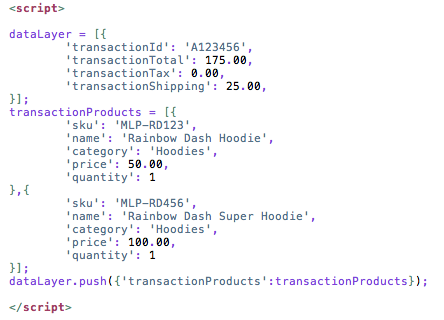
Your data layer will vary depending on your specifications and your tag management system, but regardless of the specifics, the end result is the same: a repository containing data that other tools can reference.
A data layer streamlines and standardizes the data collection process by consolidating data in a central location and then distributing it to your various marketing technologies.
Many of the data points in a data layer are very useful for analysis, such as transaction totals and product IDs. If you have implemented your data layer correctly, your analytics solution should be able to easily access the appropriate data as needed.
This is the best way to transmit data from your back-end systems to your various marketing and analytics providers because a data layer:
- Ensures that data is consistent across providers.
- It is faster to centralize and then distribute the data than to let each supplier capture the data on its own.
The Main Benefits of a Data Layer
Alignment
A data layer forces you to establish consistent naming conventions.
For example, the marketing team and the developers need to agree on a page name. It could be “pageID,” “pageName,” or simply “name.”
By establishing this from the outset, not only will both teams know how to reference this specific value, but all the analytical tools will as well.
To create a data layer, your teams need to agree on what data to collect. Creating a data layer requires you to ask yourself, “What data is important to us as a company?”
Flexibility
A data layer is not rigid and immutable. It offers the flexibility to develop and optimize your analytics according to your specific needs.
Once configured, it can evolve alongside your business, and there are likely many future use cases for your data layer that you may not be aware of at this time.
Why are Data Layer tests important?
A website is a highly volatile environment, and resources such as the data layer and marketing tags are likely to change and may even interfere with other technologies installed on the site.
All too often, a team makes a change to a website that inadvertently affects someone else's tracking.

There could also be other common errors within a data layer, for example:
- Malfunction in the order tracking and revenue reports.
- Increase or loss of information due to duplicate data.
A comprehensive audit of your data layer is important. You should perform it frequently, and although it may be tempting to simply check your data layer manually, this approach has its drawbacks:
Drawbacks of Manually Testing Your Data Layer
Using a manual method to test your data layer (such as a browser extension for debugging tags) is preferable for occasionally verifying that the data layer is present on a specific page, but monitoring the data layer for complex websites with full-stack architectures would be impractical for several reasons:
- Manual ad hoc verification is not automatically scheduled.
- So you need to remember to carry out this important data governance task.
- You may simply have too many pages, tags, variables, and technologies to be able to test your data layer within a reasonable amount of time.
- Manual verification introduces yet another opportunity for human error, whereas automation could help mitigate this problem.

How do you run a data layer test on your website?
An automated testing solution like Mr Suricate the easiest way to strengthen the monitoring of your tagging strategy by testing your data layers, analytics tags, and marketing tags using its key features:
- You can configure audits to run automatically on a regular schedule.
- Enter the number of pages you want to scan.
- Set up alerts to be notified if something in your data layer is broken.
- Test the data layer values that are triggered when the page loads or by an event.
- Set up rules to test your data layer against the structural standards you established at the beginning.
Focus on the key conversion paths
It's especially important to test your key conversion paths on a regular basis.
For example, a shopping cart or another revenue-generating conversion point will contain critical data that you’ll want to ensure is transmitted correctly and in the right format.
Tags can be accidentally overwritten or deleted whenever changes are made to your site, especially if multiple teams are working on the code for important paths.
Verifying tags, their triggers, and their values should be an integral part of your data layer audit.
Get into the habit of testing your data layer regularly with Mr Suricate
Your data layer, as the central information hub for numerous marketing and analytics technologies, warrants regular attention and maintenance.
A data layer adds significant value to your analytics and marketing tools only if it works as intended.
To see a data layer test in action with our no-code automated testing tool, schedule a demo!
FAQ
What is a data layer?
A data layer is a layer of your website that contains all data generated by visitors interacting with your site. Not all websites have a data layer, but implementing one enables more reliable, consistent, and flexible data collection.
Why are Data Layer tests important?
A website is a highly volatile environment, and resources such as the data layer and marketing tags are likely to change and may even interfere with other technologies installed on the site. All too often, a team makes a change to a site that inadvertently affects someone else’s tracking.
How do you run a data layer test on your website?
An automated testing solution like Mr Suricate the easiest way to strengthen the monitoring of your tagging strategy by testing your data layers, analytics tags, and marketing tags using its key features: The ability to configure audits to run automatically on a regular schedule.
Further Reading
To see the solution in action, check out our data layer tests.