









Permissions, Sessions, HTTPS Inspection with every delivery Web, Mobile, and APIs

Security Tests: What a User Can Actually Achieve

Access control, sessions, authentication, HTTPS: We simulate your actual user flows to verify the security observable from a browser. Penetration testing and code analysis remain the domain of your experts.

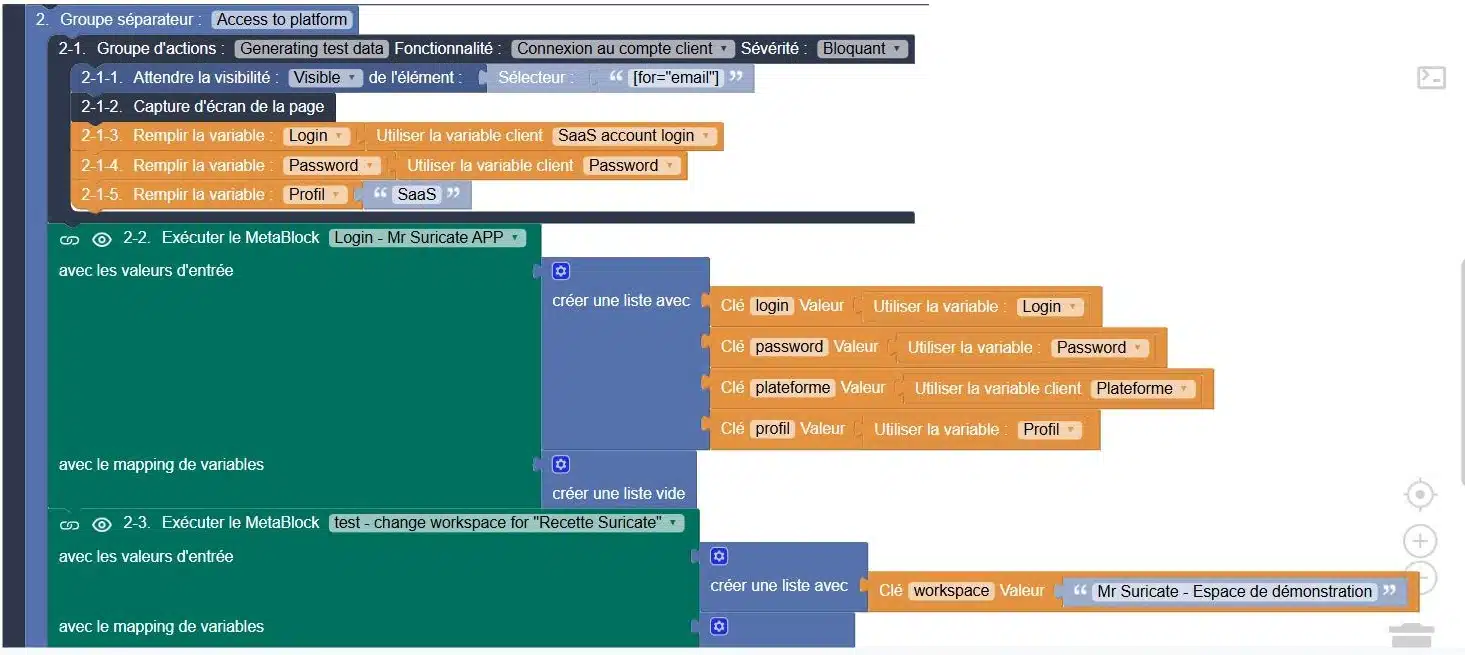
Authentication flow in the editor Mr Suricate, with protected client variables and a login metablock

They trust us

Retail, banking, manufacturing, transportation, and services: Our clients run nearly 3 million scenario simulations per month on their critical workflows.

A scan cannot connect to a customer's account

A vulnerability scan examines the technical surface of an application. It does not log in, does not switch profiles during the test, and does not verify that an invoice remains inaccessible after logging out. These checks are performed in the browser, using real-world user flows. This is exactly what an automated scenario replicates with every release.

Mouse icon

Access Control

A protected page must not open without a session or using another user's profile. The scenario attempts to access the page, one profile at a time, and verifies that access is indeed denied.

Purple Rectangles Icon

Sessions and Logout

Timeout due to inactivity, actual logout, going back in the history, a second tab left open: the session must close wherever it was opened.

Purple Gear Icon

Login, MFA, one-time code, lockout after multiple failed attempts, password reset. These are workflows just like any others; they are tested just like any others.

Purple API Test Icon

HTTP-to-HTTPS redirection, a valid certificate, no mixed content, and error pages with no technical traces: everything visible on the client side is verifiable.

Integrates with your pipeline without rewriting it

Your access controls are triggered from your CI, run in your production environments, and report back to where your teams are already working. No need to retool.

1 Triggering Your tools stay in control
  • GitLab
  • Jenkins
  • Microsoft Azure
  • API Call
  • Planning
2 ExecutionMr SuricateYour scripts run on your production environments
  • Web Tour
  • Native iOS and Android Apps
  • Real Mobile Farms
  • APIs and Internal Feeds
3 Restitution The results are delivered right to your workplace
  • Jira
  • Slack
  • SMS
  • Webhook
  • API
And maintenance that stands the test of time
  • Reusable blocksA change updates all scenarios that use it
  • AI-Assisted CorrectionSuggested corrections for scenarios with errors
  • Grouping IncidentsSimilar anomalies are processed only once

What a line-by-line check at each delivery changes

Manual Checks Before Production
With storylines that are replayed with each installment
Rights are verified manually, when the schedule allows
Access controls are replayed with each deployment
A loss of rights is discovered when a customer reports it
The gap widens within a minute of the post going live
The scan turns green; the routes are not covered
The scan and the scenarios complement each other, each within its own scope
No one checks to see if a session actually expires
Expiration and logout are tested for each profile
Audit evidence is reconstructed after the fact for the audit
Each execution leaves a timestamped record, supported by a screenshot
The inspection depends on the availability of a security expert
Basic checks run on their own; the expert handles the rest
ResultAny discrepancies in rights and sessions detected at the time of delivery must be addressed immediately, not at the next audit.
PRACTICAL GUIDE · 2026 EDITIONSoftware Quality and Testing: The Essential GuideThe fundamentals of functional testing, common pitfalls, and a method for building test coverage that stands the test of time.
Download the guide
“With Mr Suricate, we’ve automated label verification, secured our data, and gained the reliability we need to make strategic decisions without errors. Plus, it’s fun!”

Xavier ValetHead of Data Analytics - HelloWork

Support that ends whenever you want

Mr Suricate replace your QA team—it enhances it. You decide what to handle in-house and what to outsource: creating test scenarios, running them, or maintaining them over time.

  1. 1Identification of critical paths, front-end and back-end
  2. 2Writing Tests Without Code
  3. 3Continuous monitoring and alerts
  4. 4Scenario Maintenance and Development
ResultYou gain broader coverage without increasing your teams’ workload. And if you’d rather delegate everything, QA outsourcing takes over.

YOUR QUESTIONS

Frequently Asked Questions

The most common questions we receive about the actual scope of security testing.

Does an automated script replace a penetration test?

No, and the two don’t aim to achieve the same thing. A penetration test looks for exploitable vulnerabilities—often outside of standard workflows—and requires offensive expertise. A scenario simulates a real-world workflow and verifies what can be observed from the browser: access, permissions, sessions, and HTTPS. The former is run on an ad hoc basis, while the latter runs with every release.

Do you perform vulnerability scans or code analysis?

No. Vulnerability scanning, static code analysis, and infrastructure auditing remain the domain of your tools and security experts. Our scope is limited to what a user can access from a web page.

Which security checks can actually be automated along a route?

Profile-based access control, session expiration and logout, account lockout after multiple failed login attempts, the password reset process, HTTP-to-HTTPS redirection, certificate validity, the absence of mixed content, and error pages that do not leak technical information.

Are dedicated test accounts necessary?

Yes, one account per user role, and preferably accounts set aside for testing. This allows you to verify that a user role does not see what an administrator sees, without manipulating actual data.

Can these tests be deployed in production?

Yes, for all non-destructive operations: access attempts that are denied, session checks, and certificate verification. Scenarios that write data remain within your test environments or rely on isolated test datasets.

Can we test a workflow protected by two-factor authentication?

Yes. A block generates the code for an authentication app using the secret key, and the scenario enters it on behalf of the user. One-time codes such as TOTP and HOTP are also generated on the API side. MFA-protected workflows are no longer a blind spot.

Where are the identifiers used by the tests stored?

In protected client variables, which are referenced by name in the scenario and never written in plain text. The execution report displays the masked value, allowing you to share a report without exposing an account.

How do we ensure that a profile doesn't access information that doesn't concern it?

Expecting a failure rather than a success. The expected response code is configurable: a call that should return a 403 fails if it returns a 200. On the interface side, a logged-in scenario with a restricted profile verifies that a page or action remains out of reach.

Do you conduct penetration tests?

No, and that's by design. We check what can be observed from a browser: profile-based permissions, session expiration, the authentication flow, redirection to HTTPS, certificates, mixed content, and error pages with no technical traces. Penetration testing, vulnerability scanning, and code analysis remain the domain of your security experts.

Do you only believe what you see?

A 30-minute demo of your own app. You'll see one of your workflows automated in real time, without writing any code.