










Pixel-by-pixel comparisonAll resolutionsConfigurable exclusion zones

Graphical Tests: Detect WhatNo Assertion Can See

A block shifts out of place, a font changes, a button ends up below the fold. The page works, all the tests pass, and yet it no longer looks the way it should.

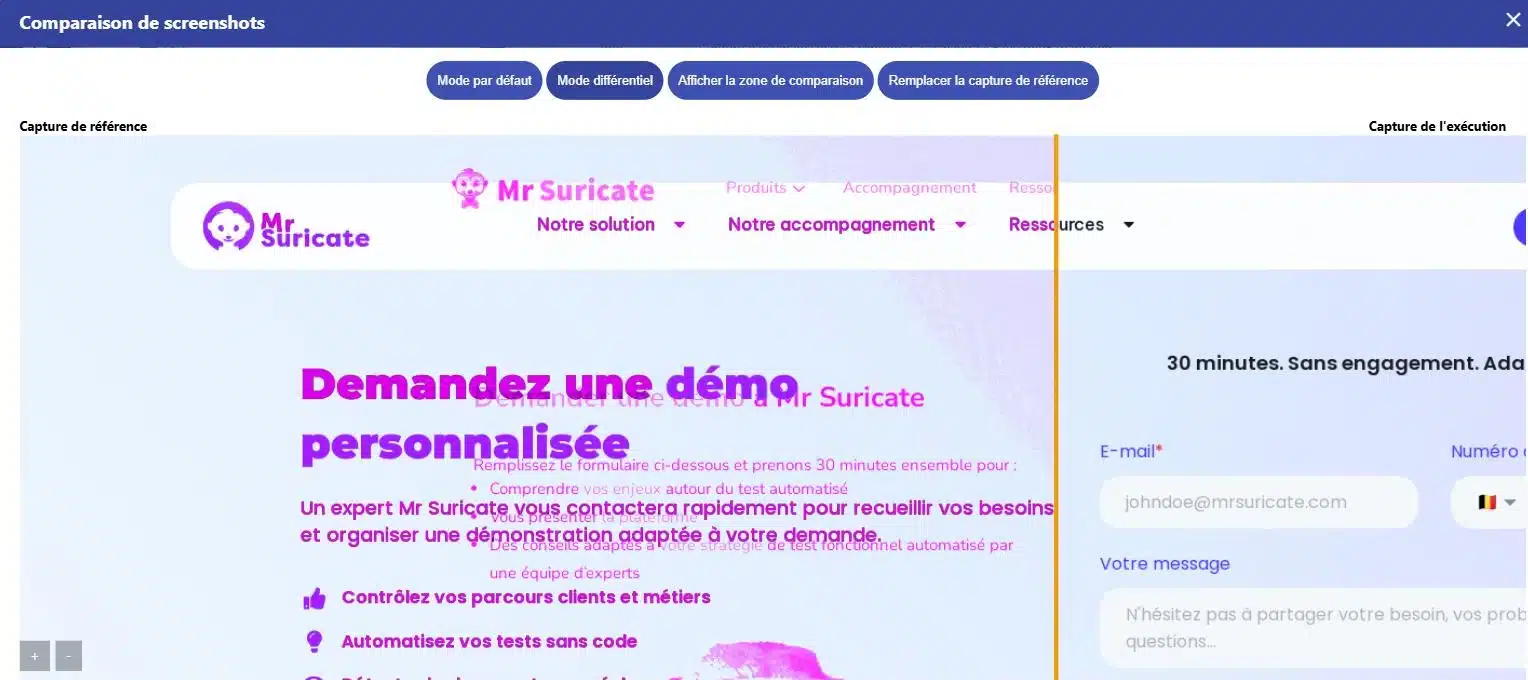
Graphical comparison screen in Mr Suricate, in differential mode highlighting the areas that have changed between the baseline capture and the run

They trust us

Retail, banking, manufacturing, transportation, and services: Our clients run nearly 3 million scenario simulations per month on their critical workflows.

A website can be functional and broken at the same time

A library update changes the height of a component, causing the price to be hidden behind an image on mobile devices. The checkout process still works, and no tests report any errors, but no one can see the amount anymore. On a regulated website, the same issue could cause a required disclosure to disappear from the page.

Mouse icon

The page compared to its reference

A reference screenshot, a screenshot from today, and the difference highlighted. You can either approve the new version or make corrections.

Purple Rectangles Icon

A threshold that you set

A shadow that shifts by one pixel is not considered an issue. The tolerance threshold is set on a page-by-page basis.

Purple Gear Icon

Excluded shifting areas

Promotional banner, today's date, carousel, advertisement. These areas are ignored to prevent false alerts.

Purple API Test Icon

The same page viewed on desktop, tablet, and your audience's mobile devices.

Integrates with your pipeline without rewriting it

Your graphical comparisons are triggered from your CI, run on your production environments, and feed back into the systems where your teams are already working. No retooling required.

1 Triggering Your tools stay in control
  • GitLab
  • Jenkins
  • Microsoft Azure
  • API Call
  • Planning
2 ExecutionMr SuricateYour scripts run on your production environments
  • Web Tour
  • Native iOS and Android Apps
  • Real Mobile Farms
  • APIs and Internal Feeds
3 Restitution The results are delivered right to your workplace
  • Jira
  • Slack
  • SMS
  • Webhook
  • API
And maintenance that stands the test of time
  • Reusable blocksA change updates all scenarios that use it
  • AI-Assisted CorrectionSuggested corrections for scenarios with errors
  • Grouping IncidentsSimilar anomalies are processed only once

What the line-by-line visual comparison reveals

Without a visual comparison
With Mr Suricate
The discrepancy becomes apparent when a customer points it out.
You can see him in the screenshot, on the day of delivery.
We skim through the key pages when we have time.
All reference pages are compared.
A successful functional test suggests that everything is working properly.
In addition to behavior, appearance is also checked.
A hidden legal notice remains hidden.
The discrepancy is noted along with the affected area.
The cell phone is checked last, so not very often.
All resolutions are passed at the same time.
The debate centers on impressions.
It involves two images and a percentage.
ResultVisual discrepancies detected upon delivery, including a before image, an after image, and the exact location of the discrepancy.
PRACTICAL GUIDE · 2026 EDITIONSoftware Quality and Testing: The Essential GuideThe fundamentals of functional testing, common pitfalls, and a method for building test coverage that stands the test of time.
Download the guide
Mr Suricate a no-brainer, because he gives you the assurance that there are no problems. Finding just one bug is enough to make the solution pay for itself for an entire year!”

Anthony CornevinE-commerce Platform Manager, Vertbaudet

Support that ends whenever you want

Mr Suricate replace your QA team—it enhances it. You decide what to handle in-house and what to outsource: creating test scenarios, running them, or maintaining them over time.

  1. 1Identification of critical paths, front-end and back-end
  2. 2Writing Tests Without Code
  3. 3Continuous monitoring and alerts
  4. 4Scenario Maintenance and Development
ResultYou gain broader coverage without increasing your teams’ workload. And if you’d rather delegate everything, QA outsourcing takes over.

YOUR QUESTIONS

Frequently Asked Questions

The most common questions we get about graphics tests.

What is a graphics test?

This is the automatic comparison of a screenshot with a validated reference screenshot. Any deviation beyond the threshold you have set is flagged, and the affected area is highlighted. This is also known as a visual regression test.

How can you avoid false alarms?

Through two settings: the tolerance threshold, which accounts for minor variations in rendering, and the exclusion of specific areas—such as promotional banners, dates, carousels, and ads. Without these exclusions, a dynamic page triggers an alert every time it loads, and no one pays attention to them anymore.

What happens when the design is intentionally changed?

You approve the new screenshot, which then becomes the reference. This is an explicit action, which ensures that no visual changes go into production without first being reviewed and approved by someone.

Is this useful if we already have functional tests?

Yes, because the two don't detect the same thing. A functional test verifies that an action produces the correct result. It doesn't detect when an element is hidden behind another, unreadable, or off-screen, even though the page remains fully usable by a machine.

Does this cover the required disclosures?

This is a common practice in regulated industries. A rate, legal notice, or warning that disappears as a result of a layout change poses a compliance risk, and this is exactly the type of discrepancy that visual comparison brings to light.

What does the result of a comparison look like?

A screen that displays the reference capture and the runtime capture side by side, with a slider to switch between them. A differential mode superimposes the two and highlights the areas that have changed.

Can we compare anything other than an entire page?

Yes. The comparison can focus on a specific element rather than the entire screen, which prevents a promotional banner or carousel from causing the test to fail even though the component being monitored hasn't changed.

How do you avoid false positives?

Through three settings: a pixel difference tolerance, which allows for minor rendering discrepancies; accounting for a size difference between the two captures; and, most importantly, an explicit wait period before capturing, since the most common cause is still an image taken while the page is loading.

What should you do when change is desired?

You can replace the baseline capture from the comparison screen. The new version becomes the baseline, and subsequent runs are measured against it.

Do you only believe what you see?

A 30-minute demo of your own app. You'll see one of your workflows automated in real time, without writing any code.