

Each execution leaves a trace that can be analyzed: the step that failed, a screenshot of what the user would have seen, and the history. And the alert is sent to the channel you’ve chosen—not to all of them.
Real-Time Alerts· Timestamped screenshots· History Saved
The team spends an hour reproducing the incident before they can classify it, and sometimes they are unable to do so. Conversely, an alert sent to everyone for every failure eventually gets filtered out by everyone. That is why every failure is recorded: the video of the execution replaces the hour spent on reproduction.

Screenshot, video of the execution, and details of the step that failed. You can see what the user would have seen without having to manually replay the process.

SMS for a critical incident in production, email to the team, and a webhook to Slack, Teams, or your on-call tool.

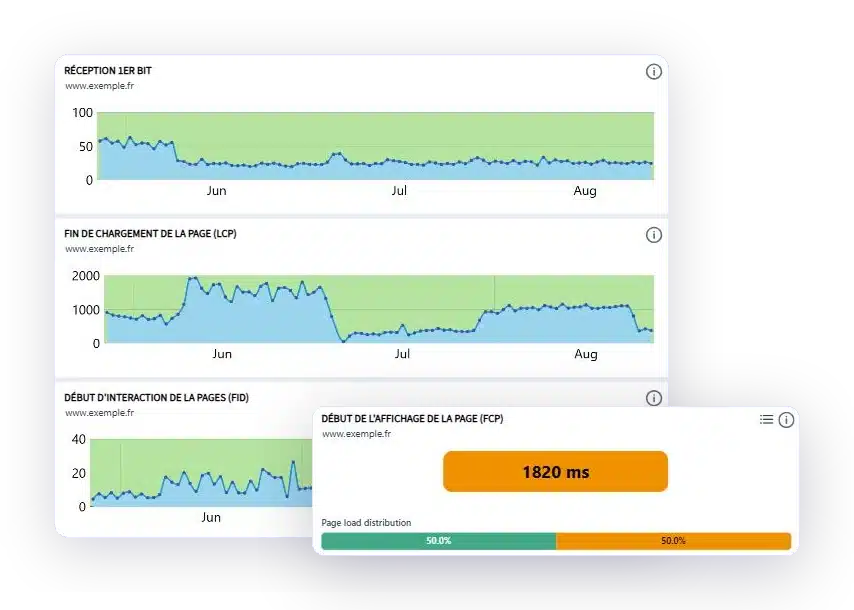
Track changes in performance over time to identify performance degradation before your users do, rather than after.

The steps that were completed, the ones that failed, the duration, and the video of the execution. That's what you open when someone asks what happened.
LIVE ALERT
Not just a vague notification. The scenario, the failed step, the time-stamped evidence, the environment, and the link that opens the incident.
A reconstructed example of alerts in actual format. The content and channels are configured by scenario and by severity level.
DASHBOARDS
A dedicated page on the platform. You can create as many dashboards as you need, choose the metrics, time period, and time interval, and then share, schedule, or export them.
Illustrative overview. Each block can be added, removed, and resized, and a single account can have multiple dashboards.
GO FURTHER
Every component of the platform, from scenario creation to verification of its execution.
Is there a term you don't understand? The automated testing glossary defines it.
YOUR QUESTIONS
Retained evidence, reporting channels, history: answers to the most frequently asked questions.
A screenshot of the step where the error occurred, a video of the played sequence, and a step-by-step breakdown of the scenario. This is what allows us to diagnose an issue without having to reproduce it manually.
Yes. Every failed execution is recorded on video. You can replay the process exactly as it was executed, up to the step where it failed, without having to set up the test environment again.
SMS for a critical incident in production, email for the list of workspace users, and webhooks to popular messaging platforms such as Slack or Teams.
Yes, that's the idea. You adjust the sensitivity based on how critical the route is, to avoid a blanket alert that everyone ends up ignoring.
Accessibility and GDPR tests generate a dated history of the checks performed, documenting what was verified and when. This serves as a useful starting point to compare with the specific requirements of your audit.
Based on the execution history. A drift in response times or a scenario that fails once in ten attempts is visible in the series, not in a single execution.
A 30-minute demo of your own application. You'll see an incident being escalated, along with its screenshot and alert.