
In a nutshell: With the rapid evolution of technology and the widespread adoption of the internet, website accessibility is becoming increasingly important. This guide covers: What is web accessibility?, What is an accessibility audit?, What does an accessibility audit test for?, Why conduct an accessibility audit?.
With the rapid evolution of technology and the widespread adoption of the Internet, website accessibility is becoming increasingly important.
However, many companies still overlook this essential aspect, which can have not only legal but also commercial and ethical consequences.
An accessibility audit is a crucial step in ensuring that your website is usable by everyone, including people with disabilities—a demographic that accounts for 16% of the world’s population.
In this article, we explore why it’s essential to conduct an accessibility audit for your website and how to do so effectively.
What is web accessibility?
Web accessibility refers to the ability of websites, applications, and digital tools to be used by everyone, regardless of their abilities or limitations.
This includes people with visual, hearing, motor, or cognitive disabilities, as well as users facing temporary challenges (such as a poor internet connection or a malfunctioning screen).
Web accessibility standards are defined by the Web Content Accessibility Guidelines (WCAG), which establish measurable criteria for making content accessible.
What is an accessibility audit?
A digital accessibility audit is a detailed analysis designed to assess the extent to which people with disabilities can access your digital content.
It assesses whether your content complies with accessibility standards and examines various elements—such as text, images, and interactive content— that contribute to a website’s perceivability, operability, understandability, and robustness.
The assessment also helps identify existing accessibility issues on your website and provides recommendations for addressing them.
What does an accessibility audit test?
Text Accessibility
Text makes up the majority of web content. Analyzing its accessibility and readability is therefore one of the most important aspects of an accessibility audit.
What is being tested:
Font size and readability: Ensure that fonts are legible and can be enlarged for users who need a larger font size.
Color contrast: Ensure that the text has sufficient contrast against its background so that it is readable for people with low vision or color blindness.
Line spacing and paragraph structure: Evaluate the spacing between lines, paragraphs, and headings to make the text easier to read and avoid overwhelming the reader.
Use of semantic HTML: Check whether headings, lists, and other structural elements use the appropriate HTML tags, thereby making navigation easier for screen readers.
Plain language: Evaluate the text to ensure that it is understandable and simple, particularly for users with cognitive impairments or low literacy levels.
Accessibility of Images, Audio, and Videos
Just like text, images, audio files, and videos make up a large portion of web content.
Without accessibility features, many users cannot interact with these elements.
What is being tested:
Alternative text (alt text): Ensure that all significant images have text descriptions that screen readers can read for users with visual impairments.
Captions and transcripts: Ensure that all audio and video content includes accurate captions and transcripts, allowing people who are deaf or hard of hearing to follow along.
Descriptive links and labels: Make sure that multimedia links and labels are descriptive and clear, avoiding vague terms such as “click here” or “learn more.”
Audio descriptions: Ensure that audio descriptions are added to visual content to provide essential context for users with sensory impairments.
Accessibility of Interactive Content
Interactive content must also be accessible to people with disabilities.
What is being tested:
Keyboard navigation: Ensure that all interactive elements—such as forms, menus, and buttons—can be used with a keyboard alone, which is helpful for people with motor impairments.
Form Labels and Error Messages: Ensure that form fields include clear labels and that error messages are descriptive, helping users understand what information is required or incorrect.
Focus indicators and visual feedback: Verify that users can see which element is currently selected or in focus when navigating using keyboard controls.
Accessible drop-down menus and modals: Ensure that complex elements such as drop-down menus and pop-ups are accessible and can be closed or navigated easily without a mouse.
The accessibility of the technology itself
This concerns the compatibility of the technology used with assistive tools.
What is being tested:
Screen reader compatibility: Verify that the content works with popular screen readers (JAWS, NVDA, etc.) by testing the reading order and element labels.
Responsive and mobile-friendly design: Ensure that the content displays properly on different screens, orientations, and devices.
Integration of assistive technologies: Verify that the website or application integrates effectively with other assistive technologies, such as Braille displays and speech recognition.
Browser and operating system compatibility: Ensure that the content functions properly and is accessible on various browsers and operating systems.
Why Conduct an Accessibility Audit?
Comply with legal requirements
In many countries, digital accessibility laws are becoming increasingly strict.
For example, in Europe, the European Web Accessibility Directive requires public bodies to make their websites and digital services accessible.
In the United States, complaints filed under the ADA (Americans with Disabilities Act) against private companies are on the rise.
An accessibility audit allows you to verify whether your website complies with current legal requirements, thereby avoiding financial penalties and legal disputes.
Expand Your Audience
An accessible website attracts a wider audience, including the millions of people with disabilities around the world.
In addition, accessibility improves the user experience for everyone: clear navigation, text alternatives, and well-structured content also benefit users without disabilities.
Improving Search Engine Optimization (SEO)
Search engines, such as Google, prioritize websites that are well-structured and adhere to web best practices.
For example, alternative descriptions (alt tags) for images—which are necessary for screen readers—also help search engines understand and index your content.
Building a Positive Brand Image
Investing in accessibility sends a clear message: your company cares about inclusion and diversity.
This builds trust and loyalty among your users, thereby enhancing your reputation.
How do you conduct an accessibility audit?
A structured approach using automated testing tools can greatly simplify the process of conducting a website accessibility audit.
1. Determine the required standard
Generally, the first step in an audit is to identify the applicable accessibility standard. For most organizations, this will be WCAG 2.1 Level AA.
However, depending on your industry, there may be other specific accessibility requirements that your organization must comply with.
It is essential to ensure that the accessibility testing tool you use properly checks for compliance with the most recent standards
2. Define the scope of your accessibility audit
Although the goal is always to achieve the highest possible level of accessibility, it’s best to start by analyzing the most common user flows—such as filling out a contact form, accessing a tutorial video, or navigating to the FAQ section.
Not only is this approach more cost-effective than a comprehensive audit, but it is also better aligned with the goal of practical accessibility.
3. Work with an accessibility expert
Accessibility standards such as the WCAG are complex and detailed. Some requirements are mandatory, while others are recommendations.
Without an expert who can explain these differences, digital compliance efforts can become extremely costly and time-consuming.
If your organization does not have significant internal resources dedicated to digital accessibility or in-depth knowledge of the WCAG, it may be a good idea to engage an external partner with proven experience in optimizing website accessibility.
4. Use an automated accessibility audit tool
Automated testing solutions are essential for identifying the most obvious issues, such as:
- Insufficient color contrast.
- Images without alternative text.
- Missing or incorrect HTML tags.
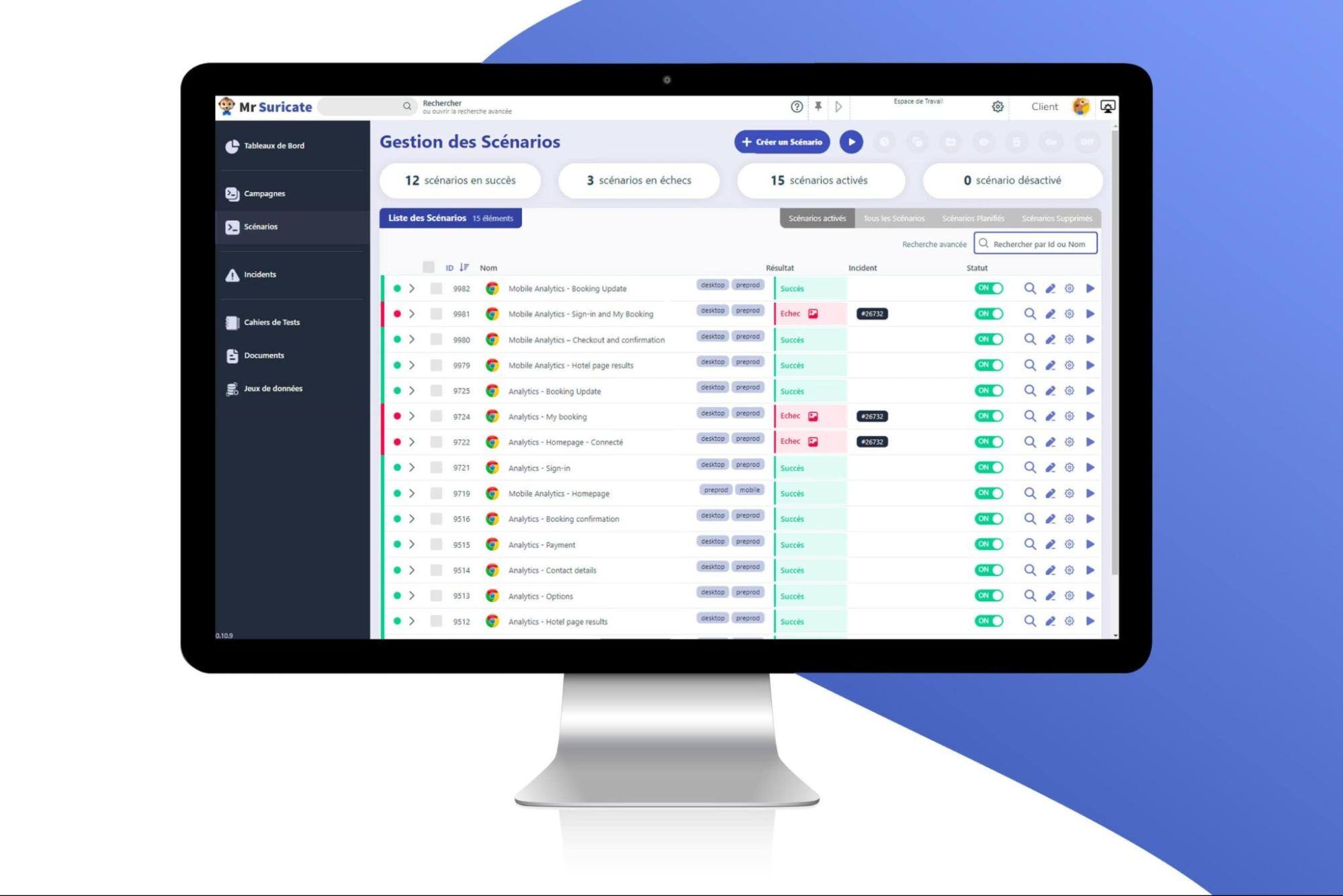
Specialized no-code SaaS tools, such as Mr Suricate, allow you to quickly scan your website and generate detailed reports.
5. Combining automation and manual testing
Although automation is a major asset, it cannot detect all accessibility issues.
For example, manual testing is necessary to evaluate:
- Easy keyboard navigation.
- The effectiveness of screen readers.
- The comprehensibility of textual content.
6. Analyze the results
The audit report must provide detailed documentation on the scope, definitions, methodologies, tools, and processes used, as well as an explanation of how it will help improve accessibility.
Once the tests are complete, categorize the issues detected:
- Critical errors: completely prevent access (for example, links that do not work for screen readers).
- Moderate issues: impair the user experience (for example, insufficient contrast).
- Possible improvements: optimizations that are not required but are beneficial (for example, better organization of headings).
Prioritize fixes based on their impact on accessibility.
7. Implement the corrections
Work with your developers and designers to resolve the issues that have been identified.
Be sure to follow best practices for accessible development, such as using ARIA attributes and semantic HTML structures.
8. Test and iterate
After each round of corrections, test the site again to verify that the changes have resolved the issues without introducing new ones.
The Benefits of a SaaS Solution for Accessibility Audits
SaaS (Software as a Service) solutions designed for accessibility offer numerous benefits to simplify and optimize your audits:
1. Automation and Time Savings
SaaS tools perform quick and accurate analyses of your website, identifying violations of WCAG standards in a matter of moments.
2. Detailed and customizable reports
They provide clear reports with specific recommendations for resolving each issue.
Some tools even offer interactive visualizations to pinpoint errors directly on your site.
3. Continuous monitoring
Once set up, an automated testing solution can continuously monitor your site to detect any new non-compliance issues following updates or content additions.
4. Scalability
Whether you have a simple website or a complex platform with hundreds of pages, a SaaS solution can be tailored to your needs.
Ensure your website is accessible with Mr Suricate
Mr Suricate, with its advanced automated testing solutions and proactive expertise, is a partner of choice for companies seeking to ensure the accessibility of their websites.
By adopting a rigorous and continuous testing strategy, businesses can not only comply with standards but also enhance the user experience for all their customers, thereby strengthening their reputation and commitment to social responsibility.
FAQ
What is web accessibility?
Web accessibility refers to the ability of websites, applications, and digital tools to be used by everyone, regardless of their abilities or limitations. This includes people with visual, hearing, motor, or cognitive disabilities, as well as users facing temporary challenges (such as a poor internet connection or a malfunctioning screen).
What is an accessibility audit?
A digital accessibility audit is a detailed analysis designed to assess the extent to which people with disabilities can access your digital content.
What does an accessibility audit test?
Text Accessibility: Text makes up the majority of web content. Analyzing its accessibility and readability is therefore one of the most important aspects of an accessibility audit. What is tested: Font size and readability: Ensure that fonts are legible and can be enlarged for users who need a larger font size.
Further Reading
To see the solution in action, check out our accessibility tests.